Nomograms.jl#
A nomogram is a chart that computes by alignment. You lay a straightedge across the scales at the values you know, and read the answer where it crosses the remaining scale. Nomograms.jl builds nomograms from formulas, solves them numerically, and draws them as SVG or with Makie.
using Nomograms

nom = additive_nomogram(
    Variable(:R1, ReciprocalScale(); domain = (1, 10), label = "R₁ (Ω)"),
    Variable(:R2, ReciprocalScale(); domain = (1, 10), label = "R₂ (Ω)"),
    Variable(:R, ReciprocalScale(); label = "R (Ω)");
    title = "Resistors in parallel",
)
drawing(nom; isopleths = [isopleth(nom; R1 = 4, R2 = 6, label = "4 ∥ 6 = 2.4")])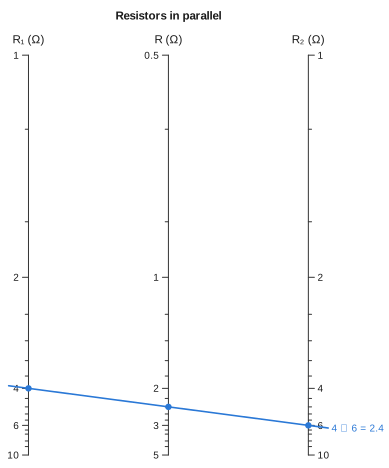
The line from 4 Ω to 6 Ω crosses the middle scale at 2.4 Ω, which is 1/(1/4 + 1/6). The middle scale is placed so that any line across the chart crosses it at the correct value.
Installation#
using Pkg
Pkg.add(url = "https://github.com/mthelm85/Nomograms.jl")
Start from your formula#
Pass auto_nomogram your function as you would normally write it, together with the range of each input, and it works out how to draw the chart:
growth = auto_nomogram(
    (r, n) -> (1 + r / 100)^n,
    Variable(:rate; domain = (1, 20), label = "rate (% p.a.)"),
    Variable(:years; domain = (1, 30), label = "years"),
    Variable(:growth; label = "growth multiple");
    title = "Compound growth",
)
drawing(growth; isopleths = [isopleth(growth; rate = 5, years = 10, label = "5% for 10 years")])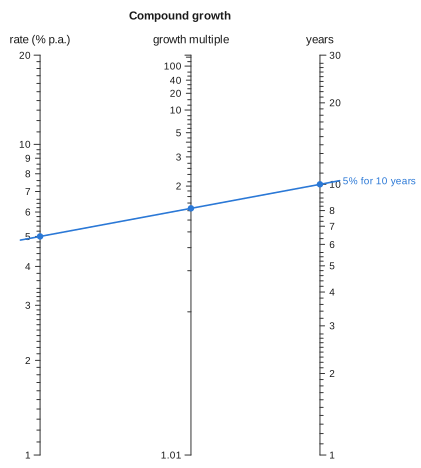
You can also use a chart as a calculator and solve for any one of its variables:
evaluate(growth; rate = 7, growth = 2) # how long until money doubles at 7%?(rate = 7.0, years = 10.244768353349112, growth = 2.0)auto_nomogram accepts any number of inputs. It checks every chart against your formula before returning it. If a formula cannot be drawn as a nomogram, you get an error that explains why. See From a formula.
Or build one by hand#
The chart at the top of this page was built directly with additive_nomogram, which draws relations of the form f₁(u) + f₂(v) = f₃(w). The formula 1/R = 1/R₁ + 1/R₂ already has this form, with 1/x as every transform. R has no domain: the length and position of the middle axis follow from the outer two, so the construction works out the range it covers:
nom[:R].domain(0.5, 5.0)Building a chart by hand gives you full control over its layout. It also lets you make charts that auto_nomogram cannot find, such as nets, charts with several curved scales, and reshaped layouts. See Building charts.
Contents#
From a formula: using
auto_nomogram, which formulas have a chart, how the transforms are found, charts with a curved scale, and charts with three or more inputs.Building charts: the parallel and N-chart constructions, curved scales from the determinant, and reshaping a chart without changing its answers.
Four or more variables: chaining charts through turning lines, and nets for relations a chain cannot handle.
Solving: reading charts numerically, and why a line can cross a scale twice.
Drawing: SVG and Makie output, styling, and how ticks and labels are placed.
Gallery: a chart built by hand from raw curves, and a range of other charts with the code that draws them.
How it works: how the package represents, builds, solves, lays out and draws a chart.
API: every exported function and type.
Bibliography: the sources for the classical results used here.