Drawing#
Rendering#
drawing turns a nomogram into a NomogramDrawing. This holds the axis polylines, tick positions, normals and labels, and isopleth segments: the geometry of the chart, with no information about how to draw it. Both backends draw from this structure, so a NomogramStyle means the same thing in either, and tests can check tick positions without rendering anything.
| dependency | output | |
|---|---|---|
svg, save_svg |
none | SVG |
nomogramplot |
any Makie backend | Figure, hence PDF/SVG/PNG |

save_svg("parallel.svg", nom; isopleths = [isopleth(nom; R1 = 4, R2 = 6)])

using CairoMakie
save("parallel.pdf", nomogramplot(nom; isopleths = [isopleth(nom; R1 = 4, R2 = 6)]))
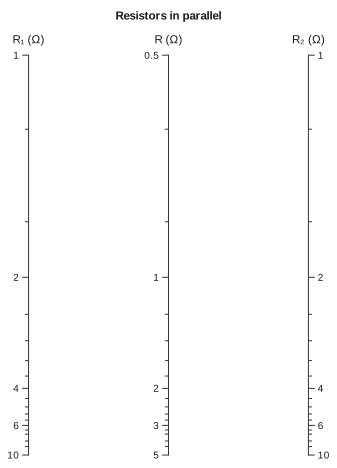
Charts and drawings also display as images wherever Julia can show one: in a notebook, in VS Code's plot pane, or on a page like this one. A chart displays without isopleths; to include them, display its drawing.
using Nomograms

nom = additive_nomogram(
    Variable(:R1, ReciprocalScale(); domain = (1, 10), label = "R₁ (Ω)"),
    Variable(:R2, ReciprocalScale(); domain = (1, 10), label = "R₂ (Ω)"),
    Variable(:R, ReciprocalScale(); label = "R (Ω)");
    title = "Resistors in parallel",
)
Styling#
The defaults follow the proportions of a standard d3 axis: hairline rules, short ticks and small type. Everything in NomogramStyle is measured in chart units. At the default pxperunit = 4 this gives 1px strokes, 6px major ticks, 3px of label padding and 10px labels, and changing the output size scales them all together.
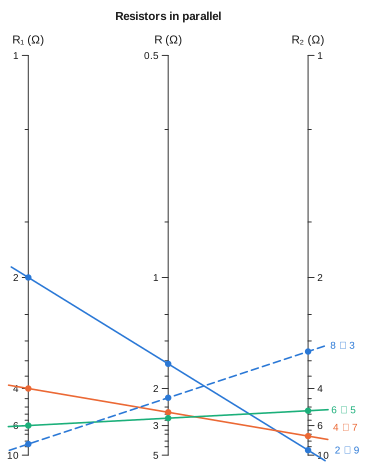
Isopleths use three colours: blue, orange and aqua. All the isopleths on a chart are visible at once, so every pair of colours has to stay distinguishable under colour-vision deficiency, and no fourth hue does once every pair is taken into account. The three colours were checked with a validator: the worst pair is ΔE 9.2 under deuteranopia and 24.0 in normal vision, against a target of at least 8.
d3's own category10 palette is not used because its orange and green are only ΔE 0.7 apart under protanopia, which makes them indistinguishable.
From the fourth isopleth on, the dash pattern changes instead of the hue: a fourth line is dashed blue, so you can still tell it from the first plain blue one. You never have to rely on colour alone. To override the colours or dashes, pass isoplethcolors and isoplethdashes, which both backends accept.
drawing(nom; isopleths = [
    isopleth(nom; R1 = r, R2 = 11 - r, label = "$r ∥ $(11 - r)") for r in (2, 4, 6, 8)
])
Ticks#
Tick values are chosen to be round numbers in the variable, then thinned by their distance apart on the page (thin_ticks). Doing it in that order keeps a non-uniform axis readable. A reciprocal or logarithmic scale keeps its labels where it is stretched and drops them where it is compressed, and the numbers that remain are still round. Axis endpoints and decade boundaries are placed first, so a crowded axis drops 9 before it drops 10.
A logarithmic axis is offered every whole mantissa in every decade, in the order it should drop them: decades, then 5s, then 2s, then the rest. No rule decides in advance based on the number of decades. The same set of candidates works for any length of axis. Eight decades settle on the familiar 1-2-5 sequence, and two decades label every mantissa. A range too narrow to hold three whole mantissas, such as 100 to 200, gets labels at its tenths instead of none between its ends. A mantissa whose label is dropped still gets a tick mark.
Tick lengths are graded in the same way, as on a ruler: the more important the value, the longer its mark. A logarithmic axis draws decades longest, then the other whole digits, then tenths. An integer axis draws 10s longest, then 5s, then the rest, and a fraction axis draws wholes, halves, quarters and so on down. Labels sit at the same distance from the axis whatever the length of their tick, so they still line up. Set graded_ticks = false on the NomogramStyle to use just two lengths.
If an axis is compressed so much that automatic selection has nothing to work with, pass ticks = [...] to the Variable. Any of these that do not fit are still dropped.
Counts and fractions#
Some quantities are not decimals. Gear teeth are counted, so a tick at 12.5 teeth is wrong however round the number is. tickstyle = :integer offers whole numbers only:
gears = multiplicative_nomogram(
    Variable(:ratio; domain = (0.5, 4), label = "gear ratio"),
    Variable(:driver; domain = (10, 40), tickstyle = :integer, label = "driver teeth"),
    Variable(:driven; tickstyle = :integer, label = "driven teeth");
    title = "Gear train",
)
drawing(gears; isopleths = [isopleth(gears; ratio = 2.5, driver = 16, label = "40 teeth")])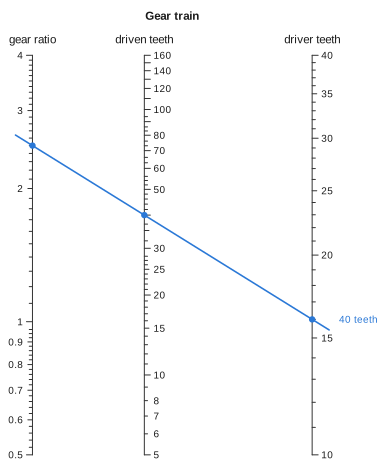
Lengths in inches are read in fractions. tickstyle = :fraction offers fractions whose denominator divides maxden, which is 16 by default; use maxden = 12 for thirds and sixths. The labels are written as on a ruler, using fractionformat:
bolt = additive_nomogram(
    Variable(:grip; domain = (1 / 4, 3), tickstyle = :fraction, label = "grip (in)"),
    Variable(:nut; domain = (1 / 8, 3 / 4), tickstyle = :fraction, label = "nut + washers (in)"),
    Variable(:length; tickstyle = :fraction, label = "bolt length (in)");
    title = "Bolt length",
)
drawing(bolt; isopleths = [isopleth(bolt; grip = 1 + 1 / 4, nut = 3 / 8, label = "1 5/8 in")])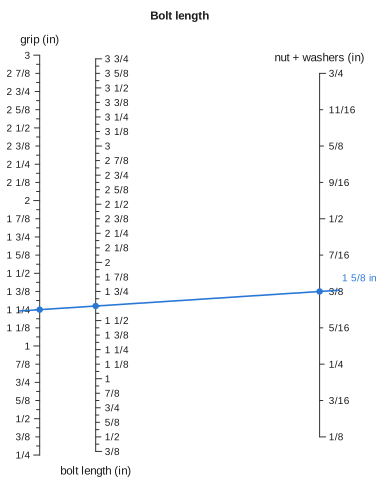
Writing a domain with Rationals has the same effect. domain = (1//8, 3) gives a fraction axis in eighths, the finest denominator its ends use. A tickstyle or maxden that you give explicitly takes precedence.
Both styles work like the decimal ones. Candidates are offered roundest first (multiples of 10 before 5s; wholes, then halves, then quarters) and thinned by distance on the page, so a crowded stretch of axis drops sixteenths before eighths. An axis end is labelled only if its value is one the style allows. Neither style changes what the chart computes. Readings come back as ordinary numbers, so an answer of 37.4 turns is reported as 37.4, not rounded to a whole count that would not satisfy the relation.
Placing the labels#
Thinning compares a scale only with itself, which is all a parallel layout needs. When scales come close together, as with a diagonal, a curve, or two axes near each other on the page, labels from different scales start to overlap, and thinning each axis on its own cannot detect this.
So each label also records its anchor point, alignment and rotation, and label_box turns those into the box the label occupies. The layout then makes one pass over the whole chart. It reserves room for axis titles first, then major tick labels, then minor ones. A label that cannot fit is dropped, and its tick mark stays. Isopleth labels are moved along the perpendicular until they are clear instead, since you asked for those explicitly.
Labels can also collide with lines. An alignment line drawn through a number makes it just as hard to read, so segment_hits_box tests each label against the lines as well, and a label that a line crosses is dropped, keeping its tick mark. Only the part of the line between its outermost crossings counts. The overhang beyond them carries no information, and it falls exactly where the outer scales' labels sit, including the label for the value being read. Set avoid_isopleths = false to keep every label anyway.
Two related details follow from the same geometry:
align_foruses both components of the direction in which a label is pushed. On a vertical axis only the horizontal component matters. On a curve, a label pushed straight down from its tick has to hang from its top edge instead of sitting centred on the point.An axis title is placed off the end of its scale, continuing along the tangent. For a vertical axis that is straight up from the top. For a diagonal or a curve it follows the scale, instead of jumping to whichever point is highest.
Set ticklabelrotation = :tangent on the NomogramStyle to turn tick labels so they run along their scale. This reads better on a steep or curved axis; by default labels stay upright. resolve_collisions = false turns off the whole collision pass.